


iScape: Landscape Design App
2.9127.00 Reviews
App Specs
- Version
- 1.4.0
- Updated On
- License
- Free
- Downloads
- 500,000+
- Developer
- iScape Holdings Inc.
- Categories
- Lifestyle
- Platform
- Android
Screenshots
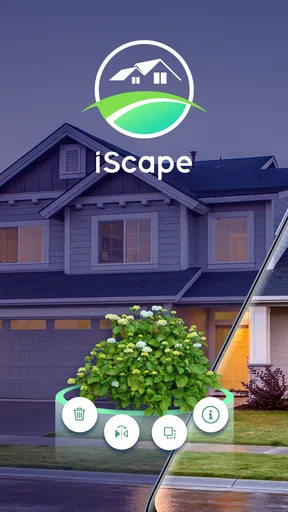
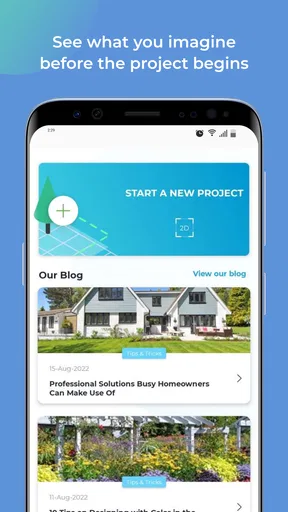
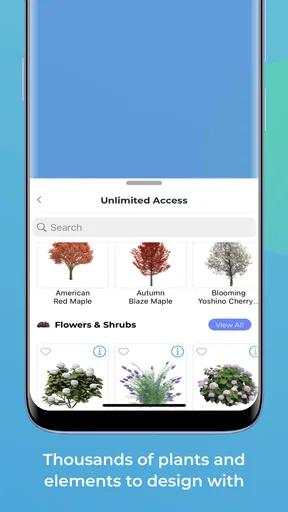

 Analysis by AppCompare
When I’m planning an outdoor refresh, the hardest part is often turning a vague idea into something I can actually judge: Will that planting bed feel crowded? Does the seating area make sense beside the path? iScape gives me a visual place to work through those questions before I start moving soil or buying plants. It’s a lifestyle app from iScape Holdings Inc., and I find it most useful as a design aid: a way to sketch out possibilities and discuss them, rather than a replacement for measuring a yard or checking what will grow there.
I’d reach for it when I have a real space and a few competing ideas, not when I simply want a gallery of inspiration. The central appeal is being able to place landscape elements into a view of the yard and compare arrangements. That makes the app relevant to homeowners, renters planning a small patio, and gardeners who want to communicate a concept to someone else. The results are best treated as a visual draft, though. A convincing picture can help me decide what I like, but it cannot settle every practical question about drainage, mature plant size, or installation.
Planning a Yard, One Decision at a Time
I find the most useful way to approach a yard redesign is to separate the big decision from the decorative details. This section sets up a practical, photo-led routine for comparing ideas, then moves into the checks that keep an appealing mock-up grounded in the space you actually have. A clear question for each draft makes the whole process easier to judge.
Start With the Space You Actually Have
Ever found yourself staring at your backyard, dreaming of turning it into a lush oasis but not quite sure where to start? Enter iScape, the app that’s about to become your best friend in landscape design. This nifty tool is perfect for anyone looking to revamp their outdoor space without getting their hands too dirty right away. Here’s my take after tinkering with it for a while.
When I first downloaded iScape, I was immediately struck by its sleek and user-friendly interface. The app makes it super easy to dive right in, even if you’re a total newbie. I mean, who has time to read a complicated manual when you’re buzzing with ideas about your dream garden?
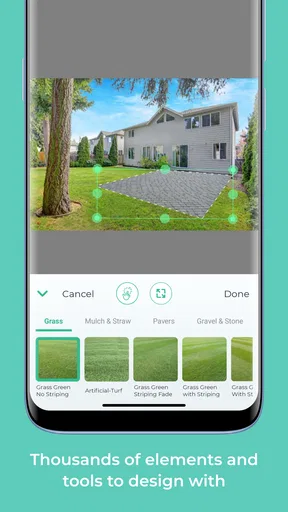
The app offers a seamless experience from the get-go. You simply take a picture of your outdoor space and start layering in elements like plants, trees, and even outdoor furniture. It’s like playing SimCity but for your backyard. And let me tell you, seeing a digital version of your vision is oddly satisfying!
That photo-first approach shapes how I’d use the app in practice. I’d take a picture from a viewpoint I can easily return to, then use it to test a small number of clear alternatives: for example, a planting strip along the fence versus a more open lawn edge. Keeping the camera angle consistent makes the comparison more useful than creating several designs from unrelated viewpoints. I’d also photograph the space in ordinary daylight, since strong shadows or a very different season can make colors and empty areas harder to judge.
Worth Reading Before You Choose

EA SPORTS FC Mobile 26 Is a Bigger Football Game, but It Takes Time

Flipboard Shows What News Apps Must Do Beyond the Feed

Switching to Android Auto Means Rethinking Your Driving Routine

Google Calendar Makes a Crowded Week Easier to Manage

Ludo King Makes the Most of the Minutes Between Plans

Baby Panda World Brings Quick Play to Modern Phones, but Its Game Library Feels Busy
For a realistic weekend scenario, imagine I’m deciding whether to replace a bare corner with a seating spot or a cluster of plants. I can try both concepts against the same yard photo, save the versions, and show them to the person who shares the space with me. That conversation becomes more concrete: we can point to where a chair might go or how a border changes the feel of the corner. I’d still check the actual dimensions outdoors before buying anything; the image helps with composition, not precise construction.
Build a Visual Draft, Not a Promise
iScape shines in its vast library of landscape elements. Whether you’re into tropical vibes or more of a minimalist, zen garden type, the app has you covered. You can choose from a plethora of plants, trees, and other outdoor features. I spent way too much time picking the perfect shade of hydrangea for my virtual garden.
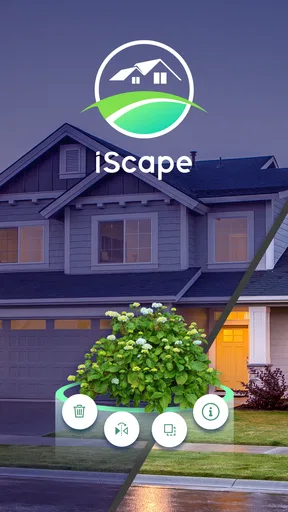
One of the coolest features is the augmented reality (AR) view. Simply point your camera at your yard and watch your design come to life before your eyes. It’s a game-changer because you can see how things fit and flow in real-time before making any permanent decisions.
For me, the visual library is most valuable when I use it to test relationships rather than chase a perfect rendering. A tree near a path, a low planting beside a taller feature, or furniture against a wall can change how an area reads even before I know the exact varieties or finishes. I’d first settle on the broad layout, then refine the selection. Otherwise, it’s easy to spend time comparing attractive details while the main question—where the space should go—remains unresolved.
AR can make a proposed arrangement feel more immediate, but I wouldn’t treat a camera preview as a scale drawing. Before committing to a tree or large fixture, I’d check its real dimensions and consider how it will look from other parts of the yard. A design that looks balanced from one camera position may block a walkway or feel oversized from the kitchen window. This is one of the app’s useful trade-offs: it gives me a quick sense of visual fit, while leaving the physical checks to me.
Use Plant Details to Ask Better Questions
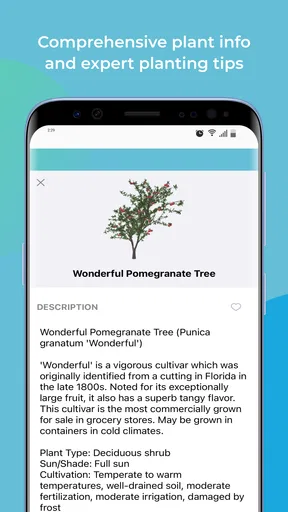
For those who like to get into the nitty-gritty, iScape doesn’t disappoint. The app offers detailed information on each plant type, such as sunlight needs and water requirements. It’s like having a personal landscape architect in your pocket.
You can also save multiple projects and revisit them later, which is perfect if you’re juggling ideas or working on different parts of your garden. Plus, the sharing feature is handy for getting feedback from friends or even showing off your budding landscaping skills.
I’d use the plant information as a first filter, not as the final word on suitability. For instance, when I’m comparing candidates for a sunny border, sunlight and watering needs help me narrow the field before I look up how each plant behaves in my own conditions. The same habit works for a shaded corner: start with the app’s details, then check whether the actual exposure in that spot matches what the plant needs. It keeps the design stage grounded without pretending that a screen can account for every local condition.
Saving separate versions is also more helpful when each one answers a different question. I might keep one project focused on a low-maintenance layout and another on a more colorful planting scheme, rather than making a long chain of tiny edits whose differences are hard to remember. When I ask someone for feedback, I’d share the alternatives with a simple prompt—such as which arrangement leaves the clearest route—so the response is about a decision I can act on, not just whether the picture looks nice.
Turn the Concept Into a Practical Plan
What really sets iScape apart is its practicality. Beyond just visualizing your dream garden, the app helps with planning and budgeting. You can generate a shopping list of all the plants and materials you’ll need, complete with estimated costs. This feature is super handy for keeping your project on track and avoiding any nasty surprises at the checkout.
The app also connects you to local nurseries and suppliers, so you know exactly where to get the best deals. It’s like having a personal shopper for your garden needs.
I’d treat the shopping list as a planning checkpoint, rather than a guaranteed final quote. Before I act on it, I’d confirm quantities, availability, and current costs with the places I plan to buy from. That matters especially when a design includes several kinds of plants or materials: a tidy on-screen list is useful for spotting the overall scope, but it should not be the only basis for a purchase. The list is most valuable early, when I’m deciding whether a concept feels affordable enough to pursue.
The supplier connection can shorten the path from an idea to a place to ask about it, but I’d still compare options and ask practical questions before choosing. If I’m unsure about a plant’s fit, a local nursery can help me check details against the actual site. I see the app’s role as joining up visualization and the next planning step, not making the decision on my behalf.
Know When a Different Tool Is Better
The usual alternative is a notebook sketch, a photo marked up by hand, or a general-purpose design tool. Those approaches can be perfectly adequate for a simple border or a quick conversation. I prefer iScape when I want landscape elements placed into a photo of the actual space, and when comparing visual alternatives is the main task. A hand sketch may be quicker for rough measurements, while a dedicated professional plan is a better fit when a project depends on exact grading, construction details, or coordinated installation.
That distinction helps set expectations. I wouldn’t use a visual design app as the sole plan for a retaining wall, complicated drainage work, or a large installation where mistakes would be expensive. Nor would I recommend spending time building a detailed scene if the immediate need is simply to measure a bed and buy a few plants. In those cases, direct measurements and advice from a qualified local professional are more useful than a polished mock-up.
For a smaller project, though, the app can make a discussion much easier. A renter could explore a container arrangement before buying pots, while a homeowner could compare where a path or seating area might sit. The benefit is not that the digital design guarantees the result; it’s that it helps people agree on a direction before they spend time and money.
Check the Cost and Fit Before Settling In
iScape is free to download, and its content rating is Everyone, which makes it approachable for a broad audience. Its current version is 1.2.3, and it requires Android 8.0 or later. The app has a 3.9 average from around 1.1 thousand ratings, with over 500 thousand installs. Those figures suggest it has found an audience, but they don’t tell me whether its paid options suit my own project.
There are in-app purchases, with items ranging from $9.99 to $299.99. I’d begin with the free experience and decide what I actually need before paying for anything. The upper end of that range makes it especially important to check the specific purchase and its value for your intended use rather than assuming every feature is necessary. If I only want to mock up one corner, I’d be cautious about committing to a costly option; someone planning several areas may judge the value differently.
The app is developed by iScape Holdings Inc. and sits in the lifestyle space, but its appeal is quite focused: it’s for people who want to think visually about an outdoor project. I’d skip it if I mainly need an exact architectural plan, a detailed materials specification, or a tool that makes site measurements and professional decisions for me. I’d also avoid expecting the first design to settle every disagreement. A picture is a useful starting point, not a substitute for checking the yard together.
My Verdict: A Useful Habit for Visual Planners
All in all, iScape is a gem for anyone looking to beautify their outdoor spaces. Whether you’re a seasoned gardener or a complete novice, the app is intuitive, fun, and incredibly useful. I loved being able to experiment with different looks and designs without any commitment.
Of course, no app is perfect. Some features are only accessible with a premium subscription, which might not be ideal if you’re on a tight budget. But honestly, the value it offers makes it worth considering, especially if you’re serious about transforming your space.
If you’ve got a green thumb—or even if you don’t—give iScape a whirl. It might just be the tool you need to take your garden from ordinary to extraordinary.
My best advice is to make the app part of a repeatable planning habit: capture the space, draft only a couple of meaningful options, check plant needs, and then verify the promising idea in the yard with a tape measure and a real-world walk-through. That sequence keeps the creative part enjoyable while catching practical snags early. For that kind of visual, low-pressure decision-making, I’d recommend trying it; for precision-led landscaping, I’d pair it with measurements and expert help rather than asking it to do a job it isn’t meant to do.
Pros
- Intuitive drag-and-drop interface.
- Extensive plant and material library.
- High-quality 3D visualization.
- Customizable design templates.
- Regular updates and support.
Cons
- Limited free version features.
- Requires internet for full access.
- Occasional app crashes reported.
- Subscription can be pricey.
- Heavy on battery usage.
FAQs for iScape: Landscape Design App
What is iScape, and how does it work?
iScape is a landscape design app that allows users to visualize their outdoor spaces before making any physical changes. By using augmented reality technology, iScape lets you create and customize virtual landscapes with a wide range of plants, trees, and outdoor features. You can plan and design your garden, patio, or backyard, making it a valuable tool for both homeowners and professional landscapers.
Is iScape suitable for beginners?
Yes, iScape is designed to be user-friendly and accessible to beginners. The intuitive interface and step-by-step guidance make it easy for anyone to use, regardless of their experience in landscape design. Additionally, the app offers various tutorials and support resources to help new users learn the basics and create stunning designs.
Can I share my designs with others using iScape?
Absolutely! iScape allows you to share your designs with friends, family, or clients. You can export your projects as images or PDFs and share them via email or social media. This feature is particularly useful for collaborating with others on a project or getting feedback on your design ideas.
What devices are compatible with iScape?
iScape is available for both Android and iOS devices. However, due to its augmented reality features, the app performs best on newer devices with advanced AR capabilities. It's recommended to check the specific device requirements on the app store to ensure optimal performance and compatibility.
Does iScape offer a free version, or is it subscription-based?
iScape offers both a free version and a subscription-based premium version. The free version includes basic features and design tools, while the premium version provides access to a broader library of plants, hardscapes, and advanced design features. Subscriptions are available on a monthly or annual basis, providing flexibility based on your needs.


